




Skip to content
applystead.

Auto apply and interview assistant

Apply to every job,
instantly.

With Auto apply on, each matching application goes out within minutes of being ready, and Applystead tracks your interviews and helps you through each call.

7 days free, then $200 a month. Card required, cancel anytime.

Hi, I'm Otto.

An example morning

Sent as soon as each was ready

Operations CoordinatorHarbor & Pine Clinics · Example employer
Applied 8:01
Office ManagerNorthwind Dental · Example employer
Applied 8:01
Patient Services LeadCedar Row Health · Example employer
Applied 8:02

Then the interview

Phone interview, Tuesday 10:30 AMHarbor & Pine Clinics · On your calendar
Briefing ready
An illustrative example with a fictional member and employers, not live jobs.

See Applystead at work.

Drop in your résumé and review the profile Applystead drafts. Turn on Auto apply once and Applystead sends your matches for you.

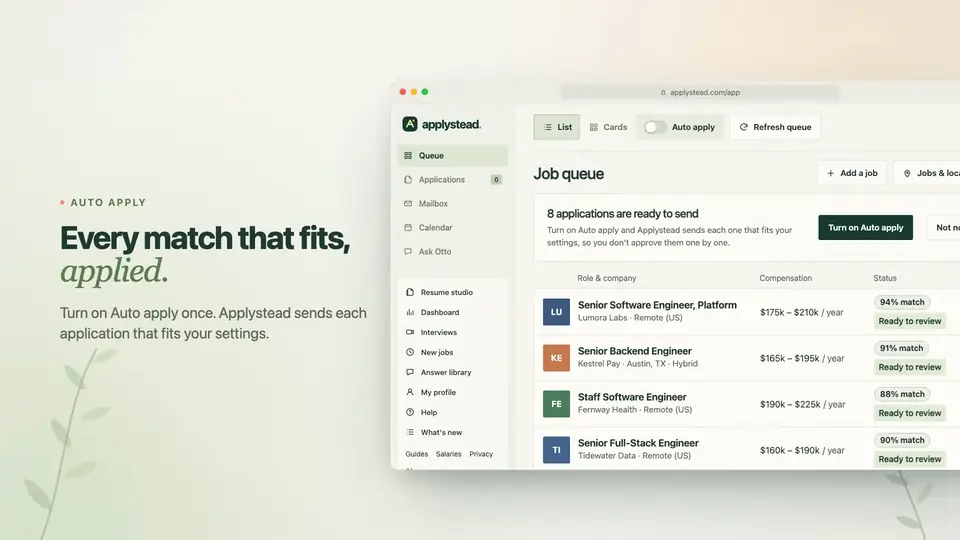
The Applystead job queue: 8 applications ready to send, each job with its pay and match score, and the Auto apply switch
A tour with a fictional member and example jobs: illustrative screens, not live jobs or real application outcomes. Music only, no narration.
What the tour shows
  1. The Applystead logo and “A little less search. A lot more possibility.”
  2. A résumé is dropped onto the start page. Applystead reads it and drafts a profile (name, headline, skills, target roles and a résumé match minimum) for the member to review and approve.
  3. The job queue lists matching example jobs with their pay and match. One consent turns on Auto apply.
  4. Each match is sent and marked Applied, and new matches keep arriving in the queue.
  5. A closing card lists Drop your résumé, Auto apply, Full auto replies, Interviews on your calendar and Applystead Assistant, then “Every job, instantly. Every interview, handled.” and applystead.com.

How it works

Set up once. After that, Applystead does the applying.

  1. Upload your résumé.

    Drop in your résumé, or describe your experience in one box. Applystead drafts your profile from it.

  2. Confirm your facts once.

    You check the profile and confirm your work status and a few facts once, and every application after that is answered from them.

  3. Turn on Auto apply.

    Applications are tailored for your matches as soon as setup ends. Turn on Auto apply and each one goes out within minutes of being ready. Replies reach your own inbox, and every interview gets its own page.

Then it runs on its own.

An example day with Auto apply and Full auto replies turned on, for a fictional member, Alex Morgan, and example employers: illustrative, not live jobs or real outcomes.

  1. 7:58 AM

    A new match arrives.

    You see: the job in your queue, with its pay and why it matches.

  2. 8:01 AM

    The application is filled in and sent.

    You see: Applied, with the résumé and answers that were sent.

  3. 8:03 AM

    The employer’s confirmation is checked.

    You see: each application listed in Applications.

  4. 2:14 PM

    A recruiter writes back.

    You see: the message, with buttons for the job description, the résumé sent and your answers.

  5. Next day, 9:40 AM

    The interview is on your calendar.

    You see: the interview on your calendar, with no back-and-forth.

No daily cap. Full auto replies are included and stay off until you turn them on.

Every interview, handled.

When an employer writes back about an interview, Applystead files it with that application, keeps it on your calendar and gets you ready for every call.

  • Scheduled for you.

    With Full auto replies, Applystead offers times that are free on your calendar, accepts one that fits and adds the interview to your connected Google, Outlook or Apple calendar.

  • Briefed before each call.

    Before every scheduled interview, Applystead writes your briefing from the job description, your notes and each message so far: where things stand, what they’re looking for, likely topics and questions to ask.

  • Help while you talk.

    Applystead Assistant for Mac, Windows and Linux waits in your menu bar or taskbar. Choose Record when the call begins, ask it anything, and it answers from the job, your briefing and the conversation so far.

  • Practice, then keep every call.

    Rehearse with an AI interviewer as often as you like. Save a call’s transcript and it’s filed under its interview, with its emails and your notes.

Applystead Assistant runs on macOS 14 or later, Windows 10 or 11 and 64-bit Linux. It listens only after you choose Record, and Applystead never receives audio. Record a call only when everyone on it agrees. The drawings are illustrative examples, not live interviews.

Your search. Your say.

Good support should make things clearer, not take control away.

Start free trial

Otto's tip Decide early what you'd say yes to: the roles, places and pay. Every choice after that gets easier.

  1. Your story, your call.

    Pick the résumé each search sends and how much it's tailored. Every answer comes from your facts, and you can change them any time.

  2. Sent when you say.

    Nothing is sent until you turn on Auto apply or tap Apply. Prefer to check each application first? Leave Auto apply off and tap Apply on the ones you want.

  3. Space to change your mind.

    Your saved documents stay in your account after a paid membership ends, and you can export your data at any time.

More than applications.

Beyond applying and interviews, your plan connects you with the people hiring. It also includes email campaigns, a website of your own and, for members in the US, a phone number for recruiters.

  • The people hiring.

    See the recruiters and hiring managers behind your applications, with cold email drafts written for you. Every contact is yours, and Applystead sends each email once you approve it.

  • Email campaigns.

    Choose a set of jobs, and Applystead finds their recruiters and hiring managers, writes an email for each person it finds and estimates the replies to expect. Approve once, and they go out from your own domain.

  • US

    A number recruiters can call.

    Your own phone number goes on your applications. Calls ring your phone first, or your assistant answers if you turn it on and leaves you a summary and transcript. Call back from the same number, so recruiters never see your own.

  • A website of your own.

    Pick a starting point, such as a portfolio or an online résumé, and Otto builds your site from your profile. Refine it by chatting with Otto while you watch the preview, then publish it at your own address.

  • From your AI assistant.

    Connect ChatGPT, Claude or another AI assistant to check your queue, read your mail and apply to jobs you approve from a chat. Developers can build on the Applystead API at no extra cost.

Illustrative examples with a fictional member and employers, not live jobs or real outcomes.

One plan, $200 a month

With a 7-day free trial (card required). Everything below is included, with no daily cap.

Questions

Thoughtful answers before you begin.

Who runs Applystead?

Royper Royco LLC, doing business as Applystead, 3903 South Congress Avenue, P.O. Box 40633, Austin, TX 78704. You can reach the people who run it at hello@applystead.com. Is Applystead legit? links each fact about prices, payments, refunds and data so you can check it yourself.

How do cancellation and refunds work?

Your membership renews monthly until canceled. Cancel before renewal to avoid the next charge: Account, then Manage subscription & billing, then Cancel subscription. Cancel a free trial before it ends and you won't be charged. The refund policy has every refund, trial and cancellation term.

How is my data handled?

Stripe hosts checkout and billing management, so Applystead never receives card numbers or security codes. Applystead is served over HTTPS only. You can export your data or delete your account from Account, confirming with your password or a code we email you. Privacy & terms lists everything we store and the controls you have.

Does paying start applications?

Not on its own. After checkout you upload your résumé or describe your experience, then confirm your profile and a few facts. Applications are tailored for your matches as soon as setup ends, and Applystead sends them for you once you turn on Auto apply.

How does Applystead help with interviews?

When an employer emails you about an interview, Applystead files it under that company’s interview with your application and adds the round when the email sets a time. With Full auto replies it offers times that are free on your calendar and adds the interview when one is accepted. Before each scheduled call you get a briefing, and Applystead Assistant on your Mac, PC or Linux computer answers your questions during the call once you choose Record.

What can I upload or write?

Start with a résumé or an application-related document, or use one text box for your background, experience, ideal roles, locations, work preferences and other relevant facts. Passwords, financial details and document numbers are not needed. We do not infer sensitive or legal facts from your identity.

Is there a daily limit?

No, there is no daily cap. With Auto apply on, Applystead keeps preparing and sending matching applications, keeping to what each employer's site accepts, and your workspace shows each one as it moves.

Can I try Applystead first?

Yes. Applystead has a 7-day free trial, then $200 USD per month. Cancel before it ends and you won't be charged.

Every job, instantly.
Every interview, handled.

Start free trial

Or tailor a résumé free with no account.

Start with what you need today.

Applystead free tools that work without an account, a closer look at tailoring and applying, guides for every step of a search, and how Applystead compares. You can also search jobs from ChatGPT or Claude with Applystead’s connector.